
















Check Every Visitor
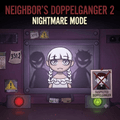
Neighbor's Doppelganger 2: Nightmare Mode places you behind a security window inside a strange facility, and every visitor at that window must be checked before the gate opens. This is a site where some arrivals are genuine residents, while others are doppelgangers copying a resident's appearance. Your job is to compare each visitor's information against the official whitelist and notice anything that does not belong.
Neighbor's Doppelganger 2: Nightmare Mode is a horror deduction game built around careful observation rather than combat. Every decision matters here, so try to take your time, inspect the evidence, and confirm that the visitor at the window is really who they claim to be.
Verify Documents And Impostors
The core loop of Neighbor's Doppelganger 2: Nightmare Mode is simple inspection, yet the small details turn every visitor into a challenge. When a visitor arrives, several pieces of information become available for you to examine.
- Read The Visitor's Cards: Click the cards below the window to review personal details and the visitor's stated reason for requesting entry.
- Check The Whitelist: Compare each card against the official resident records displayed on the right side, and confirm that the details match.
- Inspect Their Appearance: Do not trust documents alone. This is where you must look for odd features, deformities, or other visual details that could reveal a doppelganger.
- Choose The Correct Verdict: Use the green button on the right side to approve a real resident, or the red button on the left side to eliminate an anomaly.
- Avoid False Decisions: Letting a doppelganger inside or eliminating a genuine resident could end the security mission.
Nightmare Grows Harder
Neighbor's Doppelganger 2: Nightmare Mode raises the pressure by sending in harder impostors to identify. Small differences in documents or appearance can become important, so rushing the inspection is risky. The challenge comes from remembering the right information and catching discrepancies before you commit to your final choice.
Controls
- Mouse: Select documents and interact with the whitelist.
- Green Button: Approve the resident.
- Red Button: Eliminate the doppelganger.